Menu Contact us
  • Da-En

Follow your campaign

Click on the link in the email and follow the setup of the posters in your campaign.

When you click on the link, you will see a map like the one below. Each pin marks a geographical location where one of your posters will be put up. A Pin can have one of the following colors meaning:

Blue:            poster is scheduled to be put up in this location
Green:        poster is now set up in this location
Orange:     a problem when setting up the poster is being rectified 
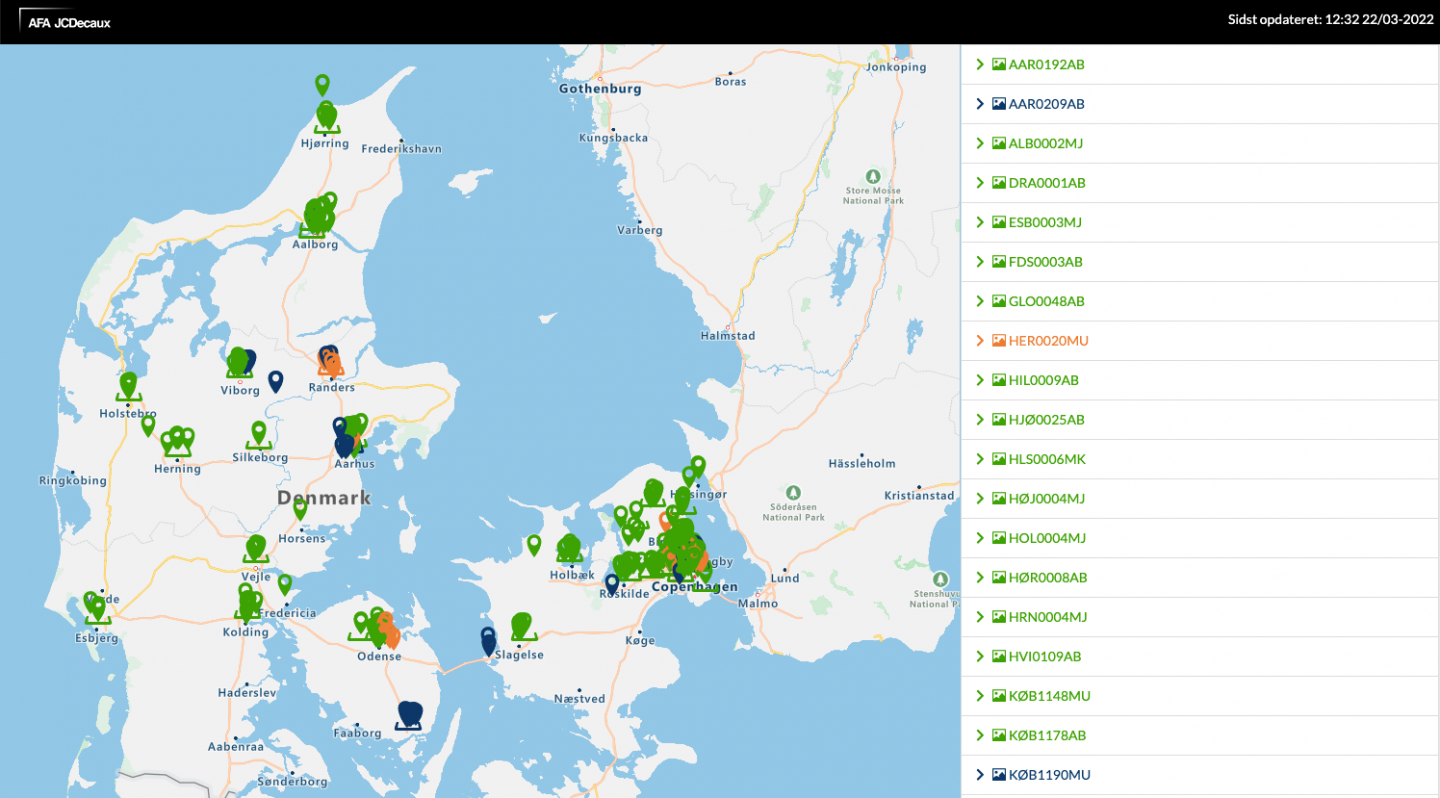
When a pin is pressed, a pop-up comes with information about customer, campaign, variant, setup week, JCD equipment number and address. By tapping on the photo (green pin with underline), the photo comes up in a new, large and independent window. 


On the right side of the map, the locations of the campaign are indicated by the equipment number. To the left of the equipment number, it is indicated by "photo icon" whether a photo of the location is taken. Green "photo icon" shows that a photo of the location has been taken. In addition, it is indicated and on the map itself with an "underline" whether a photo of the location is taken. 


Green "underline" shows that a photo of the location has been taken. In the upper-right corner, indicate the time of the last campaign setup update. Our technicians put up posters from Sunday evening at 10 pm and photo document the campaign (maximum 10%).